Mastering the Video Interview: A Complete Guide to Virtual Hiring in 2026
In March 2022, a software engineer named Marcus Delgado sat down at his kitchen table in Austin, Texas, opened his laptop, and prepared for what he thought would be a routine Zoom call with a recruiter at a Fortune 100 tech company. He had the skills. He had the experience. He even had a polished resume that had already cleared three rounds of ATS screening. But within 90 seconds of the call starting, the recruiter's attention visibly wandered. Marcus was backlit by a bright window. His audio kept cutting out. He kept glancing down at his notes instead of at the camera. He didn't get the job.
Six weeks later, Marcus applied again — this time to a competing firm offering the same role and a $12,000 higher salary. He spent two hours overhauling his video setup and another hour rehearsing on camera. He got the offer.
The difference wasn't his qualifications. It was his virtual presence.
Why Video Interviews Are Permanent: The Data
The shift to virtual hiring didn't begin with the pandemic — it was simply accelerated by it. According to LinkedIn's Talent Trends reports, 82% of talent acquisition leaders say virtual interviews have become a permanent fixture in their hiring process, even for roles that are entirely on-site. Companies like Google, Amazon, and Deloitte now use video interviews as a standard first or second screening round regardless of geography.
| Metric | Pre-2020 | 2024+ Estimate |
|---|---|---|
| Companies using video as primary screening | 22% | 74% |
| Candidates who failed due to technical issues | N/A | 31% |
| Average video interview duration (first round) | N/A | 28 minutes |
| Hiring decisions significantly influenced within 90 seconds | 33% | 49% |
Sources: LinkedIn Talent Trends 2023, Zoom/Wakefield Research 2023, Jobvite Recruiter Nation Report 2023
That last figure — 49% of hiring decisions influenced within the first 90 seconds — is the statistic that should shape your preparation strategy. Before you've answered a single substantive question, nearly half of interviewers have already formed an opinion strong enough to influence the outcome.
This guide is your roadmap to making those first 90 seconds — and every minute after — count.
The Psychology Behind the Screen: What Recruiters Actually See
Dr. Amy Cuddy's foundational research at Harvard Business School found that people make two rapid judgments about strangers: warmth (Do I trust you?) and competence (Do I respect you?). In a face-to-face meeting, warmth is communicated through a firm handshake, a natural smile, and open body posture. On video, these signals are compressed, distorted, and filtered through a screen.
""In virtual environments, the absence of physical cues forces recruiters to over-index on the signals they can see — your framing, your lighting, your eye contact, and the steadiness of your voice. These become proxies for confidence and competence." — Dr. Tomas Chamorro-Premuzic, Chief Innovation Officer, ManpowerGroup
A Stanford University study on "Zoom Fatigue" (2021) further revealed that direct eye contact on video is perceived as more intense and authoritative than in-person eye contact — because the face occupies a disproportionately large portion of the screen. This cuts both ways: strong, camera-directed eye contact builds rapport and signals confidence; avoidant or downward gaze signals insecurity.
Understanding the psychology of virtual perception isn't vanity. It's strategy.
Building Your Video Interview Environment: The Complete Setup
Your background is a silent resume. A Zoom/Wakefield Research survey found that 70% of hiring managers admit a candidate's environment influences their perception of professionalism — even when they consciously know it shouldn't.
Lighting
| Setup | Effect | Cost |
|---|---|---|
| Window in front of you (natural light) | Best — warm, even illumination | Free |
| Ring light positioned behind camera | Great — consistent, flattering | $25-60 |
| Overhead room lighting only | Acceptable — can create shadows | Free |
| Window behind you (backlit) | Terrible — your face appears as a dark silhouette | — |
| No additional lighting | Poor — unflattering, unprofessional | — |
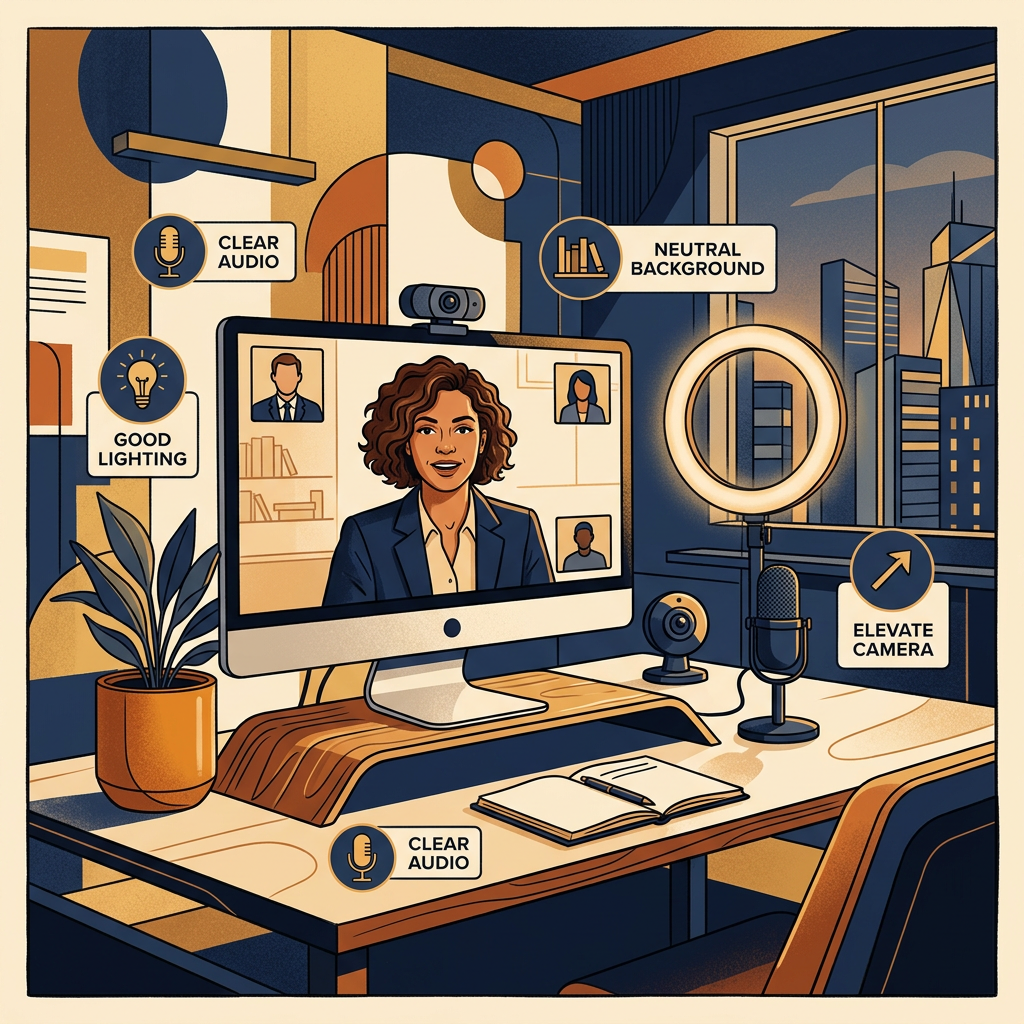
Best practice: Position a light source directly in front of you, slightly above eye level. If using a window, face it. If using a ring light, place it directly behind your camera at the same height.
Camera Position
- Elevate your camera to eye level. A laptop camera pointed upward from a desk creates an unflattering angle and a subconscious power-imbalance impression. Use a stack of books, a laptop stand ($15-30), or a dedicated monitor.
- Position yourself with your eyes in the upper third of the frame. Too much headroom makes you look small; too close is uncomfortable.
- Ensure your entire head and shoulders are visible — being cut off at the forehead or chin is distracting.
Audio
Recruiters consistently rank poor audio as the single most distracting technical issue in video interviews — more distracting than bad lighting or messy backgrounds.
| Audio Setup | Quality | Cost |
|---|---|---|
| USB condenser microphone (Blue Yeti, AT2020) | Excellent | $60-130 |
| Wired earbuds with built-in mic (Apple EarPods) | Good | $20 |
| AirPods/wireless earbuds | Good | $100-250 |
| Laptop built-in microphone | Mediocre-Poor | Free |
| Speakerphone | Poor (echo, room noise) | — |
Best practice: A $30 USB condenser microphone will outperform any built-in laptop mic dramatically. It's the single highest-ROI investment for video interviews.
Background
- Ideal: Plain wall, tidy bookshelf, or simple home office setup
- Acceptable: Virtual background (blur or simple static image) — use sparingly, as movement artifacts can be distracting
- Avoid: Kitchen, bedroom (especially visible bed), high-traffic areas, cluttered spaces
The Pre-Interview Technical Checklist
Don't let a preventable technical failure derail months of job searching. Run through this checklist 30 minutes before every video interview:
- ☐ Platform installed and updated (Zoom, Teams, Google Meet)
- ☐ Camera and microphone tested using the platform's built-in test feature
- ☐ Internet speed checked (minimum 10 Mbps upload for reliable HD video)
- ☐ Computer plugged in (battery death mid-interview is catastrophic)
- ☐ All notifications silenced on all devices (phone, tablet, smartwatch, desktop)
- ☐ Other applications closed (especially anything that could pop up or make noise)
- ☐ Backup plan confirmed (recruiter's phone number or email in case of technical failure)
- ☐ Water within reach (dry mouth is common during long interviews)
- ☐ Notes positioned at eye level near camera (not on the desk where you'd look down)
- ☐ Interview link tested (clicked to confirm it opens correctly)
- ☐ Background checked on camera (look for anything distracting or unprofessional)
Commanding Virtual Presence: Body Language and Delivery
Eye Contact: The Single Most Important Adjustment
Look at the camera lens, not the interviewer's face on screen. Looking at their face on your screen feels like eye contact — but it isn't. Your camera is at the top of your screen; when you look at their face, your eyes are aimed slightly downward, which signals lack of confidence.
This is the hardest habit to build but the most impactful.
Technique: Place a small sticky note or colored dot directly beneath your camera lens. Train yourself to look at it when making key points. You can glance at the screen to read their reactions, but anchor your delivery — especially your opening statement and closing — directly into the camera.
Vocal Delivery
Research published in the Journal of Voice found that vocal pitch, pacing, and variation account for up to 38% of a listener's first impression of credibility. On video, with reduced visual cues, this figure climbs higher.
Three vocal adjustments for video:
-
Slow down by 15%. Video compression and slight audio delays make fast speakers sound rushed. What feels slightly slow to you will sound natural to them.
-
Pause deliberately. A two-second pause before answering a complex question signals thoughtfulness, not uncertainty. It's one of the most powerful techniques in video communication.
-
Vary your pitch. Monotone delivery is amplified on video. Practice reading your talking points aloud the night before and notice where you naturally emphasize words — lean into that variation.
The S.T.A.R. Framework, Calibrated for Video
Behavioral interview questions — "Tell me about a time when..." — remain the dominant format. The S.T.A.R. method (Situation, Task, Action, Result) is well-known, but most candidates fail to calibrate it for video's pacing demands:
| S.T.A.R. Component | Ideal Time (Video) | Common Mistake | Fix |
|---|---|---|---|
| Situation | 10-15 seconds | Over-explaining context | Set the scene in 2 sentences max |
| Task | 10 seconds | Skipping entirely | State your specific responsibility clearly |
| Action | 45-60 seconds | Being too vague | Describe YOUR specific actions, step by step |
| Result | 20-30 seconds | Omitting numbers | Always include a quantified outcome |
Total target: 90-120 seconds per answer. MIT OpenCourseWare research on video engagement found that viewer attention drops by nearly 40% after the 90-second mark. Keep your answers tight.
Deep Preparation: Going Beyond the Company Website
Recruiters can tell within minutes whether a candidate has done surface-level research or deep preparation:
| Surface-Level Research | Deep Research That Impresses |
|---|---|
| Read the About page | Read their most recent earnings call transcript or press release; reference a specific data point |
| Know the CEO's name | Follow the interviewer on LinkedIn; note their recent posts and find genuine common ground |
| Can describe the product | Read Glassdoor interview reviews for the specific role — they often reveal exact questions from previous rounds |
| Know the industry | Reference BLS Occupational Outlook data about where the field is heading |
A tactical preparation schedule:
- 48 hours before: Research the company (financials, recent news, product updates). Follow the interviewer on LinkedIn.
- 24 hours before: Review the job description. Prepare 5 S.T.A.R. stories mapped to the key requirements. Write 3-5 thoughtful questions to ask.
- 2 hours before: Review your resume and talking points. Set up your physical environment.
- 30 minutes before: Run the technical checklist. Get water. Take 5 deep breaths.
- 5 minutes before: Join the call. Be the first person there.
Your Resume as a Conversation Map
Here's a counterintuitive insight: your resume isn't just a document you submit — it's the script for your interview story. Every bullet point is a potential talking point. Every achievement metric is a potential S.T.A.R. answer.
Before your interview, map your resume to the job description:
- Highlight the 3-5 job requirements that appear most important
- For each requirement, identify the resume bullet point that demonstrates your qualification
- Prepare a 90-second S.T.A.R. story for each of those bullet points
- Practice each story on camera until it feels natural, not rehearsed
This approach means you're never caught off guard — every behavioral question maps back to something you've already prepared.
fullCV.online helps you build a resume that naturally creates these interview talking points: AI-assisted bullet points that quantify impact, clear structure that maps to common interview frameworks, and ATS optimization that ensures you get to the interview in the first place.
After the Interview: The Follow-Up That Seals It
Send a follow-up email within 2-4 hours of the interview — not the next day.
Template:
Subject: Thank You — [Role Title] Interview
Hi [Interviewer Name],
Thank you for taking the time to speak with me today about the [Role Title] position. I especially enjoyed our conversation about [specific topic discussed — shows you were listening].
Our discussion reinforced my excitement about the role. I'm particularly enthusiastic about [specific aspect of the role or team]. I believe my experience with [relevant skill/achievement] would allow me to contribute meaningfully from day one.
Please don't hesitate to reach out if you need any additional information. I look forward to hearing about next steps.
Best regards, [Your Name]
The Video Interview Mastery Checklist
Environment:
- ☐ Light source in front of you, slightly above eye level
- ☐ Camera at eye level (not looking up from desk)
- ☐ Clean, professional background
- ☐ External microphone or quality earbuds
Technical:
- ☐ Platform updated and tested
- ☐ Internet speed verified (10+ Mbps upload)
- ☐ Notifications silenced on all devices
- ☐ Backup contact info ready
Preparation:
- ☐ 5 S.T.A.R. stories prepared and practiced
- ☐ Resume bullet points mapped to job requirements
- ☐ Company deeply researched (beyond the About page)
- ☐ 3-5 thoughtful questions prepared
Delivery:
- ☐ Eye contact directed at camera lens, not screen
- ☐ Speaking pace 15% slower than normal
- ☐ Answers kept to 90-120 seconds
- ☐ Follow-up email sent within 2-4 hours
The video interview is now a permanent part of the hiring process. Mastering it isn't optional — it's the difference between a rejection and an offer.